Managing This Website with IssueOps
June 24, 2026 · news · 11 min read
BySESE Lab
Think of It Like a Restaurant Kitchen
Imagine you walk into a restaurant. Instead of shouting your order to the chef, you write it down on a slip of paper. The chef reads the slip, plans the dish, prepares it, and plates it. When it is ready, the chef asks you to review the dish before it goes to the table.
IssueOps works the same way. Instead of a kitchen, we use GitHub Issues. Instead of a chef, we use an AI agent called OpenCode. Instead of food, we produce website changes: new pages, bug fixes, or content updates. The “kitchen” is a GitHub Actions workflow that runs automatically whenever the right command appears in an issue comment.
Bayangkan Seperti Dapur Restoran
Bayangkan Anda masuk ke sebuah restoran. Alih-alih meneriakkan pesanan ke koki, Anda menuliskannya di secarik kertas. Koki membaca catatan itu, merencanakan hidangan, menyiapkannya, dan menyajikannya. Setelah siap, koki meminta Anda meninjau hidangan sebelum diantar ke meja.
IssueOps bekerja dengan cara yang sama. Alih-alih dapur, kami menggunakan GitHub Issues. Alih-alih koki, kami menggunakan agen AI bernama OpenCode. Alih-alih makanan, kami menghasilkan perubahan situs web: halaman baru, perbaikan bug, atau pembaruan konten. “Dapur”-nya adalah workflow GitHub Actions yang berjalan otomatis setiap kali perintah yang tepat muncul di komentar issue.
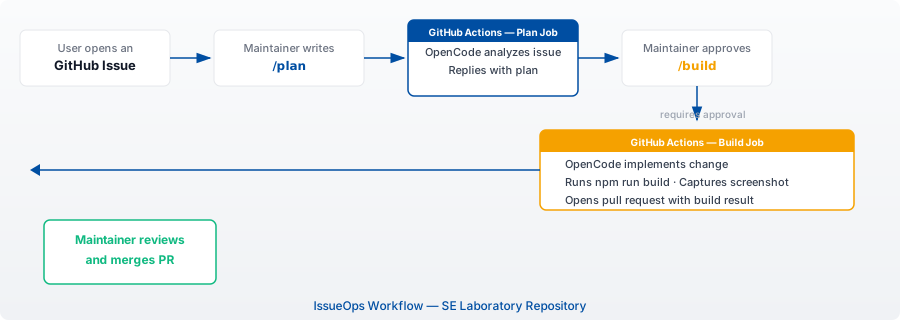
Step by Step: How It Works Here
Here is what happens every time someone wants to change something on this website:
-
Open an issue. A contributor opens a GitHub Issue describing what they want: a new blog post, a layout fix, or a feature idea.
-
Plan with
/plan. Any authorized member can comment/planon the issue. You can also add extra context after the command, such as/plan focus on the layout only. This triggers a GitHub Actions job that verifies authorization (first by checking organization membership through an authenticated GitHub API, falling back to a repository-level allowlist), then runs OpenCode in planning mode. OpenCode reads the issue, analyzes the codebase, and replies with a concrete implementation plan, including which files to change, how to validate, and open questions. -
Approve with
/build. If the plan looks good, an authorized member comments/build(optionally with extra context like/build use Astro Islands for interactivity). The workflow validates authorization, then switches OpenCode to implementation mode. It creates a new branch, writes the actual code, runsnpm run buildto verify everything compiles, captures a screenshot of updated features (stored as a workflow artifact, never committed to the repository), and opens a pull request linked to the issue. If the build fails, a new error issue is automatically created to track the failure. -
Review and merge. The pull request appears with a build summary. The maintainer reviews the changes, and if everything looks correct, merges the PR. The change goes live on the next deployment. Merged OpenCode branches are automatically cleaned up after one week.
The entire process happens inside GitHub. There is no need to clone the repository, run a local development server, or even open a code editor. Everything from planning to deployment is handled through issue comments and automation.
Langkah demi Langkah: Cara Kerjanya di Sini
Inilah yang terjadi setiap kali seseorang ingin mengubah sesuatu di situs web ini:
-
Buka issue. Seorang kontributor membuka GitHub Issue yang menjelaskan apa yang diinginkan: postingan blog baru, perbaikan tata letak, atau ide fitur.
-
Rencanakan dengan
/plan. Setiap anggota yang berwenang dapat mengomentari/plandi issue tersebut. Anda juga dapat menambahkan konteks tambahan setelah perintah, seperti/plan fokus pada tata letak saja. Ini memicu job GitHub Actions yang memverifikasi otorisasi (pertama dengan memeriksa keanggotaan organisasi melalui API GitHub terautentikasi, dengan fallback ke daftar izin tingkat repositori), lalu menjalankan OpenCode dalam mode perencanaan. OpenCode membaca issue, menganalisis codebase, dan membalas dengan rencana implementasi yang konkret, termasuk file mana yang akan diubah, cara memvalidasi, dan pertanyaan terbuka. -
Setujui dengan
/build. Jika rencana terlihat baik, anggota yang berwenang mengomentari/build(secara opsional disertai konteks tambahan seperti/build gunakan Astro Islands untuk interaktivitas). Workflow memvalidasi otorisasi, lalu mengalihkan OpenCode ke mode implementasi. Ia membuat branch baru, menulis kode aktual, menjalankannpm run builduntuk memverifikasi semuanya terkompilasi, menangkap tangkapan layar fitur yang diperbarui (disimpan sebagai artefak workflow, tidak pernah dikomit ke repositori), dan membuka pull request yang terhubung ke issue. Jika build gagal, issue error baru akan otomatis dibuat untuk melacak kegagalan tersebut. -
Tinjau dan gabung. Pull request muncul dengan ringkasan build. Maintainer meninjau perubahan, dan jika semuanya terlihat benar, menggabungkan PR. Perubahan akan tayang pada deployment berikutnya. Branch OpenCode yang telah digabung akan otomatis dibersihkan setelah satu minggu.
Seluruh proses terjadi di dalam GitHub. Tidak perlu meng-clone repositori, menjalankan server pengembangan lokal, atau bahkan membuka editor kode. Semuanya dari perencanaan hingga deployment ditangani melalui komentar issue dan otomatisasi.
Why This Matters for Beginners
If you are new to software engineering or open source, IssueOps lowers the barrier to entry in several ways:
No local setup required. You do not need Node.js, a code editor, or a terminal. You only need a GitHub account and a web browser.
Transparent planning. Before any code is written, the AI explains exactly what it will do. You can read the plan, suggest changes, and learn from the reasoning before anything gets built.
Built-in quality checks. The workflow runs npm run build on every change. This acts as a safety net: if the AI makes a mistake, the build fails and the PR shows the error before anyone reviews it.
Learn by reading. Every pull request is a recorded case study. You can browse past PRs to see how a feature was planned, implemented, and verified, all in one place.
Mengapa Ini Penting untuk Pemula
Jika Anda baru mengenal rekayasa perangkat lunak atau open source, IssueOps menurunkan hambatan masuk dalam beberapa cara:
Tidak perlu setup lokal. Anda tidak memerlukan Node.js, editor kode, atau terminal. Anda hanya perlu akun GitHub dan browser web.
Perencanaan yang transparan. Sebelum kode ditulis, AI menjelaskan secara persis apa yang akan dilakukan. Anda dapat membaca rencana, menyarankan perubahan, dan belajar dari penalarannya sebelum apa pun dibangun.
Pemeriksaan kualitas bawaan. Workflow menjalankan npm run build pada setiap perubahan. Ini bertindak sebagai jaring pengaman: jika AI membuat kesalahan, build gagal dan PR menampilkan error sebelum ada yang meninjaunya.
Belajar dengan membaca. Setiap pull request adalah studi kasus yang terekam. Anda dapat menjelajahi PR sebelumnya untuk melihat bagaimana fitur direncanakan, diimplementasikan, dan diverifikasi, semuanya di satu tempat.
Adapting IssueOps to Your Own Project
You do not need to be an AI expert to set up IssueOps. The workflow used in this repository is defined in a single file: .github/workflows/opencode.yml. Here is how you can adapt it:
-
Copy the workflow file. The
opencode.ymlfile contains three jobs:check-auth,plan, andbuild. Copy it to your own repository under.github/workflows/. Also copycleanup-merged-branches.ymlfor automatic branch cleanup. -
Configure authorization. Update the
check-authjob to use your own GitHub organization or team. By default, it checks membership in these-polinemaorganization through an authenticated API (requires a token withread:orgscope), with a fallback to a repository-level allowlist file (.github/opencode-allowlist.txt). Add authorized users to the allowlist as a simpler alternative. -
Set up secrets. Add your API key (
OPENCODE_GO_API_KEY) to your repository secrets. This authenticates the OpenCode CLI with the AI provider. -
Adjust the build command. If your project uses a different build tool (like
yarn build,pip install, orcargo build), update the build job accordingly. -
Start small. Open your first issue, comment
/plan, and watch the AI propose a plan. Review it carefully before approving with/build.
The same pattern works for documentation sites, personal blogs, open source libraries, and internal tools. Any project that accepts code changes through GitHub can benefit from IssueOps.
Mengadaptasi IssueOps ke Proyek Anda Sendiri
Anda tidak perlu menjadi ahli AI untuk menyiapkan IssueOps. Workflow yang digunakan di repositori ini didefinisikan dalam satu file: .github/workflows/opencode.yml. Berikut cara mengadaptasinya:
-
Salin file workflow. File
opencode.ymlberisi tiga job:check-auth,plan, danbuild. Salin ke repositori Anda sendiri di bawah.github/workflows/. Salin jugacleanup-merged-branches.ymluntuk pembersihan branch otomatis. -
Konfigurasi otorisasi. Perbarui job
check-authuntuk menggunakan organisasi atau tim GitHub Anda sendiri. Secara default, ini memeriksa keanggotaan di organisasise-polinemamelalui API terautentikasi (memerlukan token dengan scoperead:org), dengan fallback ke file daftar izin tingkat repositori (.github/opencode-allowlist.txt). Tambahkan pengguna berwenang ke daftar izin sebagai alternatif yang lebih sederhana. -
Atur secrets. Tambahkan kunci API Anda (
OPENCODE_GO_API_KEY) ke repository secrets Anda. Ini mengautentikasi OpenCode CLI dengan penyedia AI. -
Sesuaikan perintah build. Jika proyek Anda menggunakan alat build yang berbeda (seperti
yarn build,pip install, ataucargo build), perbarui job build sesuai kebutuhan. -
Mulai dari yang kecil. Buka issue pertama Anda, komentari
/plan, dan lihat AI mengusulkan rencana. Tinjau dengan cermat sebelum menyetujui dengan/build.
Pola yang sama berlaku untuk situs dokumentasi, blog pribadi, pustaka open source, dan alat internal. Proyek apa pun yang menerima perubahan kode melalui GitHub dapat memanfaatkan IssueOps.
Join the Software Engineering Laboratory
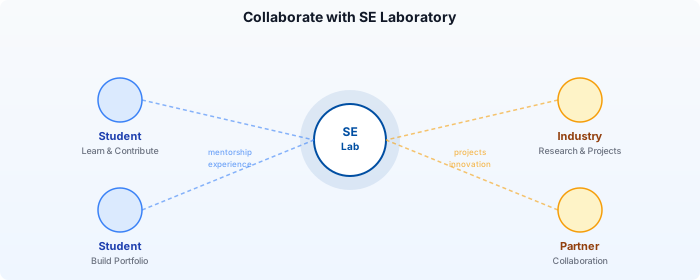
The SE Laboratory at Politeknik Negeri Malang is a place where students, researchers, and industry partners work together on real software engineering projects. IssueOps is just one example of how we experiment with modern development practices.
For students: Join us to gain hands-on experience with production-grade tools and workflows. You will work on real projects, contribute to open source, and build a portfolio that stands out.
For industry partners: Collaborate with us on research projects, sponsor student work, or propose joint initiatives. Our lab bridges academic knowledge with practical industry needs.
How to get involved:
- Browse our research focus areas and publications.
- Open an issue on our GitHub repository to start a conversation.
- Reach out via email at the contact shown on our homepage.
We believe that tools like IssueOps make software development more accessible, collaborative, and fun. Come build with us.
Bergabung dengan Software Engineering Laboratory
SE Laboratory di Politeknik Negeri Malang adalah tempat mahasiswa, peneliti, dan mitra industri bekerja sama dalam proyek rekayasa perangkat lunak nyata. IssueOps hanyalah salah satu contoh bagaimana kami bereksperimen dengan praktik pengembangan modern.
Untuk mahasiswa: Bergabunglah dengan kami untuk mendapatkan pengalaman langsung dengan alat dan alur kerja tingkat produksi. Anda akan mengerjakan proyek nyata, berkontribusi pada open source, dan membangun portofolio yang menonjol.
Untuk mitra industri: Berkolaborasilah dengan kami dalam proyek penelitian, dukung pekerjaan mahasiswa, atau usulkan inisiatif bersama. Lab kami menjembatani pengetahuan akademik dengan kebutuhan industri praktis.
Cara untuk terlibat:
- Jelajahi bidang fokus riset dan publikasi kami.
- Buka issue di repositori GitHub kami untuk memulai percakapan.
- Hubungi kami melalui email yang ditampilkan di beranda.
Kami percaya bahwa alat seperti IssueOps membuat pengembangan perangkat lunak lebih mudah diakses, kolaboratif, dan menyenangkan. Mari membangun bersama kami.
Related Content
AI-Assisted Unit Test Generation with PHP
Learn how to use AI coding assistants to generate, review, and refine PHPUnit tests. Covers practical workflows with PHP examples, common AI pitfalls (hallucinations, brittle tests, missing edge cases), and when AI-assisted test generation helps, and when it fails.
UML Mini Series Part 2: Use Case Scenario
Part 2 of the UML Mini Series. Learn what a Use Case Scenario is, why it bridges requirements and design, and how to write a full scenario for the 'Enrol in Course' use case: with structured table, main success flow, and alternative flows.
AI-Powered Requirements Automation with PHP
Learn how to use LLMs and AI-assisted workflows to turn vague stakeholder requests into structured user stories, SRS snippets, and acceptance criteria. Covers prompt engineering for requirements, a complete PHP helper to call LLM APIs, traceability mapping, and the limitations of AI-generated requirements, including hallucinations and bias.
LLM-Assisted Documentation Automation for PHP Projects
Learn how to use LLMs to generate, maintain, and validate API documentation, README files, inline comments, and changelogs for PHP/Laravel projects. Covers Scribe, PHPDoc, MkDocs, and custom LLM pipelines with a human-in-the-loop review workflow, and shows where LLMs fail and hallucinate.
Code Quality Analysis with PHP
Learn how to automate code quality checks with PHPStan, PHP_CodeSniffer, and PHPMD. Covers static analysis, PSR-12 style linting, code metrics, and a GitHub Actions CI/CD pipeline that blocks poor-quality code from reaching production.
Comments
Sign in with GitHub to comment.